


In September, we carried a story that said Windows 8 would not play well in enterprise due to its new interface and the fact that it was just a little bit too much like Windows 7 from an IT admin point of view.
These were the views of two Gartner analysts who reckoned also that the long shadow of Windows XP would also stunt the effect of Windows 8 in enterprise, leading to a possible flop for Microsoft
.
While the analysts certainly put up a number of good arguments, after spending some time playing with Windows 8 on both touch-enabled and non-touch devices, I have say that they are simply incorrect.
When I installed Windows 8 RC on a non-touch laptop, I was more than a little confused. While I understood the then "Metro" interface, now called "Modern UI", was touch-oriented and based on the excellent Windows Phone system, it just seemed a bit pointless on a non-touch device when there was a perfectly good, old fashioned desktop underneath.

I wrote about it in a blog post, asking for a toggle to switch of the Modern UI option as the default desktop on install.
However, that was then, this is now.
Many of the services behind the live, configurable tiles that form the Modern UI were not live or not representative at release candidate stage and so much of the sparkle about these features was absent.
Coupled with that is the concept of the desktop replacement tablet and the entire value proposition of Windows 8 in enterprise was not really apparent hitherto. All right, it wasn’t apparent for me.
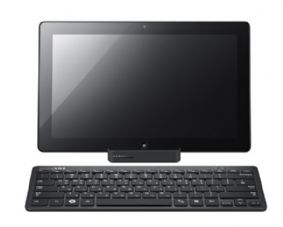
The desktop replacement tablet is essentially a tablet that is bigger and heavier than an iPad but that can be cradled and connected to a large screen that allows the user to have a full desktop experience in the office, but the tablet can easily be taken along when on the move or going home. Far from being unwieldy, I found that my Samsung test device was not much heavier than an iPad and yet still offered the full capabilities of a desktop on the move.
Added to all of this is the horizontal task-oriented organisation of Windows 8 and suddenly things started to crystallise for me. Say for example you were searching for a Word document, you simply drag your finger from the top right corner of the bezel onto the screen, activating the right hand menu. Type your search parameters in and when it finds the relevant document, it then offers you a range of likely tasks related to the document, from editing in Word, sharing through collaboration tools or social media etc. A little bit like dropping a file onto an application icon but so much more, the task-oriented system replaces the Start-programs-application-action sequence that was so familiar since Windows 95. This makes full use of the Modern UI as it means that very direct actions can be taken without having to remember where applications reside or under what menus a particular operation might be organised. Moving from the old inverted tree structure of menu organisation, the flattening of tasks massive improves both accessibility and productivity but the thing is that this benefit exists through the Modern UI, whether through a touch interface or not. The cursor gives access to such functionality just as easily as a finger does.
Now, there are criticisms still. For one, using the browser through the Modern UI produces on experience which is around IE 10 and makes a significant step forward in web presentation, but if IE 10 is used through the old style desktop, it produces a different look and feel with what looks like a totally separate history.
And it must be said that Windows 8, in terms of core capabilities to the enterprise is not much different from version 7, but the reality is that the XP argument made by the analysts actually applies the opposite way too. So many enterprises did not move on 7 because they were still happy with XP means that skipping 7 to go to 8 is now a realistic possibility, especially as XP support, even for those with "special" relationships, is running out and so more of a critical issue now than when 7 emerged.
From an initial stance of scepticism, through a bit of indifference and on to understanding and appreciation, I can see that Microsoft has now done with Windows what it has done with Windows Phone. It has taken inspirations and lessons from the world of users and competitors and come up with something which is bold, competitive, innovative and anticipates the needs and wants of future enterprise users-I know, I was as surprised as anyone! But, by defining a new niche in terms of devices, addressing consumerism in the corporate environment and making something that is actually quite cool to use, I think that this gamble is a good one.



Subscribers 0
Fans 0
Followers 0
Followers